Tumblr: Social Media & Art
- 3.8
- Rating
- 100.00M
- Installs
- Free
- Price

 Analysis by App-foxy
I came away from Tumblr with the feeling that it is less like a conventional social network and more like a large collection of personal publishing spaces connected by shared interests. I could follow artists, fandoms, writers, photographers, meme makers, and niche communities without having to keep every interaction tied to people I know offline. That makes it unusually good for browsing and discovery, but it also means the experience depends heavily on how carefully I shape my dashboard.
As a free social media and art app from Tumblr, Inc, it is aimed at mature users aged 17 and over. It has been available since August 14, 2010, and its long presence is reflected in the enormous amount of material already circulating through its blogs and communities. The Android version I reviewed is 46.0.0.107 and requires Android 8.0 or later. The app has passed 100 million installs, carries a 3.8 average from around 3.7 million ratings, and includes optional purchases priced from $0.99 to $149.99 per item.
What using Tumblr actually feels like
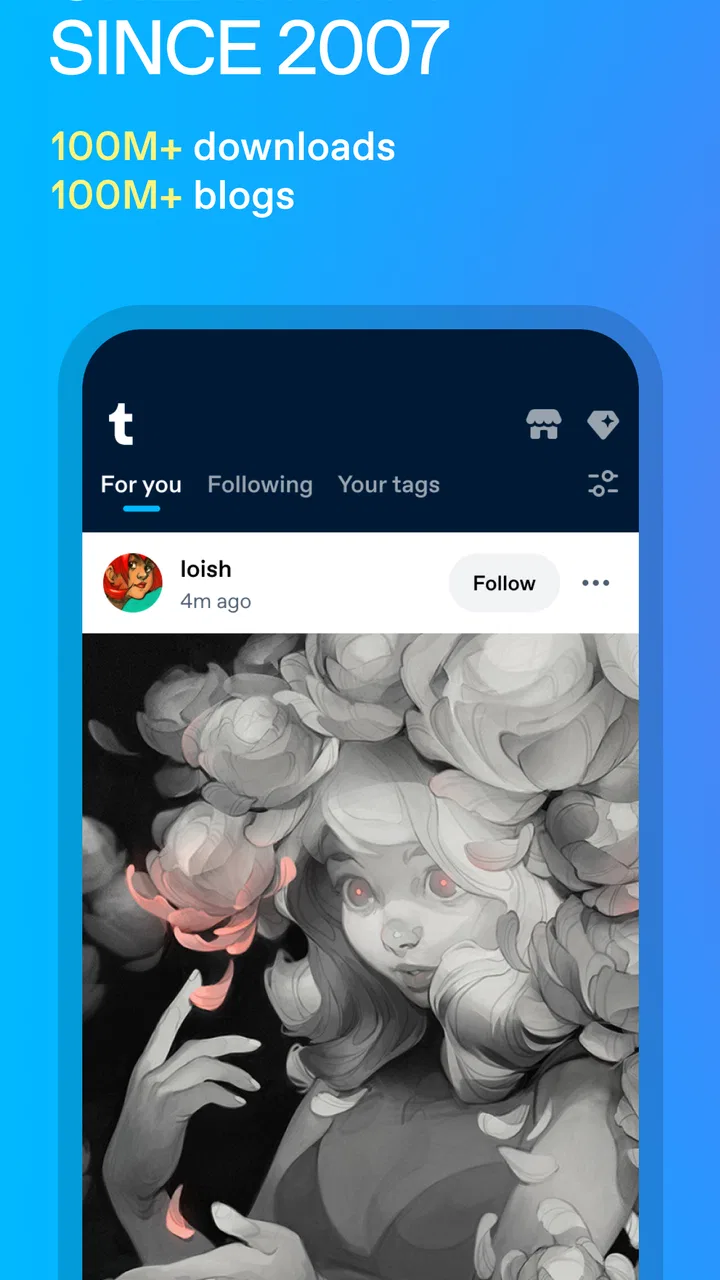
The first thing I noticed is that Tumblr rewards curiosity more than routine posting. On many social platforms, the main question is “What are my friends doing?” Here, I was more often asking, “What subject do I want to explore next?” A single post can lead to a blog, then to a tag, then to a chain of related posts that feels closer to wandering through a digital art fair than scrolling through a standard news feed.
You May Also Like

 Pandora - Music & Podcasts
Pandora’s Music Is Easy to Start, but Harder to Recover
Pandora’s strength is its low-effort path from a seed to a station. Its weak spot is how much confidence it asks you to place in connection, setup, and quiet recovery.

 AccuWeather: Weather Radar
AccuWeather Review: A Quick, Clear Forecast for Everyday Decisions
For everyday plans, the best forecast is the one you can understand quickly. AccuWeather makes rain timing, radar, and local conditions easy to act on, with a few trade-offs.

 Hill Climb Racing
Why Hill Climb Racing Still Turns Crashes Into One More Run
A tiny car, a bumpy hill and one more upgrade: Hill Climb Racing keeps resurfacing because its simple chaos makes every near-miss feel personal.

 AliExpress - Shopping App
AliExpress Makes Global Shopping Feel Personal, but Shoppers Bear the Risk
AliExpress turns a global marketplace into a pocket-sized discovery engine. Its reach is useful, its shopping loop compelling, and its trade-offs easy to miss.

 Lords Mobile: Kingdom Wars
Lords Mobile Is a Kingdom-Building Routine, Not a Quick Match
A case-by-case verdict on the building, battles, device demands, and social commitments that make Lords Mobile rewarding for some players and exhausting for others.

 PDF Scanner app - TapScanner
TapScanner Makes Paperwork Easier to Capture, Check, and Share
TapScanner makes scanning with a phone feel less like a rescue operation and more like a dependable step in getting work done. Its capture tools are useful, though not flawless.
More From Our News Desk
View All News


That atmosphere is especially appealing if your interests are specific. A broad platform may offer a little of everything, while Tumblr often lets a topic develop its own language, visual style, jokes, and recurring references. Fandom discussion, original illustrations, edits, photography, personal writing, and short-form humor can sit beside one another, but each community tends to feel distinct.
I also found the blog format more expressive than a simple profile page. A person can build an identity through the posts they publish, reblog, and arrange around a theme. For artists, that can make the account feel like a living portfolio. For readers, it creates a useful trail of recommendations because the people I followed were not only showing their own work; they were also pointing toward work they considered interesting.
The trade-off is that Tumblr can feel confusing when you expect a clean, predictable feed. The tone, quality, and subject matter can change quickly. A carefully curated art post may be followed by an intense fandom argument or a highly personal entry. I would not call that inconsistency a flaw in itself, but it does mean that new users need to spend time adjusting what they follow and how they browse.
Why the app works well for artists and fandom readers
For an artist, Tumblr can serve several purposes at once. I could imagine using it to share finished illustrations, post work-in-progress images, collect references, and keep a public archive that feels more personal than a purely commercial portfolio. The reblog-centered culture also gives work a chance to travel through communities rather than relying only on direct followers.
For fandom users, the appeal is different. Tumblr is useful when you want to follow a topic from many angles: fan art, analysis, jokes, recommendations, personal reactions, and long-form discussion. The platform’s conversational rhythm makes it possible to encounter a subject through many voices instead of receiving only official updates.
It is less suitable if your main goal is rapid customer support, professional networking, or polished short videos. A visual-first network may be better for someone who wants a highly streamlined gallery. A mainstream social platform may be easier for keeping up with relatives and local friends. Tumblr’s strength is not universal convenience; it is the depth and personality of its interest-based communities.
Building a dashboard that does not become exhausting
My most useful practical lesson was to treat following as an editing task, not a one-time decision. At first, it is tempting to follow every interesting blog encountered through a tag or recommendation. That can make the dashboard noisy very quickly. I got a better result by following a smaller mix of original creators, community-focused blogs, and accounts that consistently shared material I actually wanted to see.
A good workflow is to explore broadly first, then narrow down. I would spend a short session searching through a topic, open the blogs that repeatedly caught my attention, and only follow the ones that still looked worthwhile after viewing more than one post. This matters on Tumblr because a blog’s overall voice can be very different from the single post that introduced it.
Another useful habit is to separate discovery from reading. Tags and public browsing are good for finding new interests, while the dashboard is better when I want a more familiar stream. Mixing both activities without any boundaries can turn a quick check-in into an endless session. Tumblr is particularly capable of pulling users into connected material, so deciding what I came to find before opening the app helps.
Posting, reblogging, and the importance of context
Tumblr’s culture makes reblogging feel more meaningful than simply pressing a share button. A reblog can become part of a personal collection, a recommendation to followers, or a contribution to a longer conversation. I found that the surrounding text matters: adding a thoughtful comment changes how the post reads on my own blog and can make the interaction more useful than passing along an image without explanation.
That same flexibility requires care. Before reblogging artwork or personal writing, I would check the original source and read any notes attached to the post. A post can travel far from the person who first created it, and the visual simplicity of the interface can make attribution easy to overlook. For anyone using Tumblr as an art portfolio, keeping original posts clearly identifiable is a sensible way to protect the connection between the work and its creator.
There is also a difference between using the app as a private-interest journal and using it as a public identity. If I were posting personal reflections, I would think carefully about whether the material belonged on a public blog or in a more limited setting. The platform encourages expression, but an expressive environment does not remove the need to decide what should remain searchable, shareable, or permanently associated with an account.
Trust begins with visible choices, not assumptions
Because Tumblr contains art, personal writing, fandom discussion, and mature material, I paid attention to the choices available while using it rather than assuming that every part of the service would suit me automatically. The mature 17+ age classification is important context: this is not an app I would recommend casually to a child, and parents should not treat the age label as a substitute for discussing online communities and privacy.
I found it sensible to review account and content preferences before spending much time building a dashboard. The practical reason is simple: Tumblr’s value comes from personalization, and personalization works best when I actively decide what I want to encounter. If I follow a topic for one evening and then leave it shaping my feed indefinitely, that is a curation mistake rather than evidence that the app understands me perfectly.
The safest approach is to make deliberate choices before the dashboard becomes your default environment. I would check which blogs and topics I am following, reconsider them periodically, and use the available account controls whenever an interaction no longer feels appropriate. On a platform with such varied communities, that small amount of maintenance makes a noticeable difference.
I also prefer services where I can see what I am choosing instead of relying entirely on hidden automation. Tumblr’s blog-based structure gives me more direct clues about why something appears: I can often trace it to a blog I followed, a post that was reblogged, or a topic I explored. That does not make every recommendation transparent, but it gives the user a more understandable route through the content than a feed that feels entirely detached from visible actions.
Handling mature and sensitive material thoughtfully
The mature age classification should influence how and where the app is used. Tumblr can bring together creative work and personal conversation, but those categories do not always arrive in separate, predictable compartments. I would avoid opening it in situations where a mixed public feed could be embarrassing or inappropriate, especially when handing my phone to someone else.
For a teenager near the age boundary or for a family sharing devices, the right question is not only whether the app is free. It is whether the user understands public posting, unwanted contact, reblogging, and the lasting nature of online material. The app’s social design can encourage quick reactions, while the consequences of a public post may last much longer than the moment in which it was written.
When I encountered material I did not want to continue seeing, the useful response was to avoid engaging with it and adjust my follows and account choices instead. Interacting with unwanted content can make it feel more prominent, while a calmer review of the dashboard usually produces a better result. I would also treat messages, comments, and requests from unfamiliar accounts with the same caution I use on any public social service.
For artists, sensitive content creates an additional responsibility around boundaries. A creator may want to share difficult themes while still making the context clear. Readers, meanwhile, should not assume that an artistic presentation makes every subject comfortable or suitable for every setting. Tumblr’s open-ended culture is rewarding precisely because it allows varied expression, but that variety calls for more personal judgment than a tightly controlled publication.
Privacy-minded habits for everyday use
I would not use Tumblr as a place to publish information that needs strict confidentiality. A social blog is designed for sharing, discovery, and interaction, so I would keep addresses, private contact details, workplace information, and identifying details about other people out of public posts. This is not a criticism unique to Tumblr; it is a basic boundary that becomes especially important when a platform encourages reposting.
A realistic everyday example is a person who spends a lunch break collecting drawing references and then posts a sketch in the evening. The convenient workflow is to browse a few tags, save ideas in a personal system, publish the sketch with a short explanation, and return later to review responses. The risky workflow is to include a photograph of a private workspace with visible documents, location clues, or another person in the background. The creative task may be harmless, but the surrounding details can reveal more than intended.
I would also separate public enthusiasm from personal disclosure. It is fine to say that I enjoy a fictional series or admire an artist; it is different to reveal private conversations, travel plans, or information about friends. Tumblr’s conversational tone can make a post feel like a note to a small circle even when it is being published in a much wider environment.
Account security deserves the same attention as content choices. I would use a unique password, keep recovery details current, and review account activity if anything seemed unusual. These are straightforward habits, but they matter more when an account contains years of artwork, writing, conversations, and carefully built community connections.
Where the free model fits—and where it may not
Tumblr is free to install and use, which makes it easy to experiment without committing money at the beginning. Optional in-app purchases range from $0.99 to $149.99 per item, so I would pay attention during any purchase flow and avoid assuming that every useful-looking option is necessary for ordinary browsing or posting.
The free entry point is a real advantage for someone who wants to explore communities, follow artists, or publish a personal blog before deciding whether the service belongs in their routine. It also lowers the barrier for small creative projects. A new illustrator can begin sharing work without first paying for a dedicated publishing service.
Still, free does not mean frictionless. The cost may be measured in time, attention, and moderation effort rather than an upfront fee. I had to curate the dashboard, evaluate sources, and decide how much interaction I wanted. Someone looking for a quiet, tightly filtered reading experience may find that work tiring.
I would also avoid treating Tumblr as a complete replacement for a professional portfolio, an encrypted private journal, or a direct sales channel. It can support discovery and identity-building, but creators who need precise presentation, controlled client communication, or dependable business workflows may be better served by specialized tools alongside it.
How it compares with familiar social alternatives
Compared with a conventional friend-focused network, Tumblr is better for interest-based discovery and less useful for keeping up with everyday contacts. Compared with an image-first portfolio service, it offers more commentary, personality, and reblog-driven circulation, but less of a clean gallery feeling. Compared with a short-video platform, it is slower and more text-friendly, which suits analysis and fandom conversation but may feel less immediate to users who expect constant video recommendations.
Those differences helped me decide who should install it. If I want to find unusual art, follow a long-running fandom conversation, or build a blog around a particular voice, Tumblr is a strong candidate. If I mainly want direct messages with close friends, polished professional presentation, or a feed limited to people I know, I would choose something else first.
The comparison also explains why ratings alone do not settle the question. A 3.8 average across around 3.7 million ratings suggests a large and varied audience, but it cannot tell me whether the app matches my habits. Someone who enjoys open-ended discovery may consider Tumblr distinctive, while someone who dislikes unpredictable feeds may experience the same design as clutter.
Who should skip it
I would skip Tumblr if I wanted strict control over every item that appears in a feed, or if I found reblog culture confusing and distracting. I would also hesitate to recommend it to anyone unwilling to manage their own boundaries around mature material and public posting. The app is not difficult because the basic actions are mysterious; it is demanding because the amount of possible content is so broad.
It may also be the wrong choice for a person who wants social media to remain closely tied to a real-world identity. Tumblr’s appeal often comes from themed blogs and interest-based personas, while some users prefer a single, clearly recognizable profile. Neither approach is better in every situation, but they create very different expectations about privacy and interaction.
Finally, creators who need a fully controlled business presence should see Tumblr as one channel rather than the whole plan. It can help people discover work and understand an artist’s interests, yet it does not remove the need for a separate place to organize commissions, client details, or private professional conversations.
My cautious verdict after using it
I recommend Tumblr to readers who enjoy exploring communities rather than simply checking updates from friends. Its best moments come from the combination of personal blogs, creative work, fandom knowledge, and the unexpected connections between them. I particularly like that a user can be both a publisher and a curator: I can share my own work while also building a record of what inspires me.
My recommendation is conditional, though. I would begin with a carefully chosen set of follows, review account and content choices early, and keep personal information out of public posts. I would also remember that the mature 17+ classification is meaningful and that a free app can still demand considerable attention and judgment.
After that initial setup, Tumblr becomes much easier to evaluate on its own terms. It is not the cleanest portfolio, the most predictable social feed, or the best private diary. It is a flexible, sometimes messy publishing community where art and conversation travel through people’s interests. For the right user, that messiness is the point. For anyone who wants a controlled and narrowly defined social experience, another platform will probably feel more comfortable.
My final view is that Tumblr is worth trying when you have a clear reason to explore its communities—an art practice, a fandom, a writing habit, or a desire to discover unusual creative voices. Use it actively rather than passively: curate what reaches you, think before you post, and treat visible account choices as part of the experience. With those habits, the app offers a distinctive social space without requiring me to pretend that every part of it will suit every person.
FAQs for Tumblr: Social Media & Art
01What is Tumblr: Social Media & Art used for?
Tumblr is a social platform focused on creative expression, communities, and discovering niche interests. After exploring the app, I found it especially useful for browsing short posts, artwork, photography, GIFs, videos, quotes, fan content, and personal blogs. Users can follow topics or individual creators, reblog posts, publish their own content, and communicate through likes, replies, and messages.
02Is Tumblr: Social Media & Art free to download and use?
Yes, Tumblr can generally be downloaded and used for free on Android and iOS devices. The main social and publishing features are available without a subscription, although the experience may include advertising and optional paid features depending on the platform or region. A stable internet connection is recommended, particularly when loading image-heavy dashboards, videos, GIFs, and other visual content.
03Can I control what content appears on Tumblr?
Tumblr provides several tools for managing your experience, including following and unfollowing blogs, filtering tags, adjusting content-label preferences, and blocking or reporting accounts. However, because Tumblr contains a wide range of user-generated material, the dashboard can still be unpredictable. Before downloading, users should be comfortable reviewing privacy and content settings and supervising younger users where appropriate.
04Can I create and customize my own Tumblr blog?
Yes, creating a personal blog is one of Tumblr’s central features. You can publish text, images, artwork, GIFs, videos, links, audio, and other media, then organize posts with tags so they are easier to discover. Tumblr also supports customization options for blog presentation, although the exact design tools and appearance may vary between the mobile app and the web version.
05Does Tumblr require an account, and is it suitable for private sharing?
An account is normally needed to follow blogs, personalize the dashboard, interact with posts, and publish content. Tumblr offers privacy-related controls, including options for limiting interaction and managing who can access certain blog content, but it should not be treated as a completely private messaging service. Avoid posting sensitive personal information, and check each blog’s visibility and interaction settings before sharing.
Pros
- Excellent discovery tools for niche communities and creative interests.
- Strong support for GIFs
- images
- video
- audio
- and long-form text posts.
- Customizable dashboard helps users shape a highly personal content feed.
- Reblogging makes it easy to share posts and credit original creators.
- Useful tagging system helps posts reach audiences beyond existing followers.
Cons
- The dashboard can become overwhelming when following many active blogs.
- Content quality varies widely
- with occasional reposts and little context.
- Finding specific account settings may take time for new users.
- Some communities and posts may include mature or sensitive themes.
- The app can use considerable storage when media is cached frequently.

Tumblr: Social Media & Art
Gallery